
British Fencing requires every fencer to be a member of BF to ensure you and your fencing friends are insured for personal accident (to yourself) and personal liability (injuring others).
If you do not provide proof of membership when required you will not be able to fence at any competitions or clubs
You must also comply with all FIE/BF clothing requirements
- Log in to Sport80, British Fencing’s Membership System
- This takes you to your membership profile
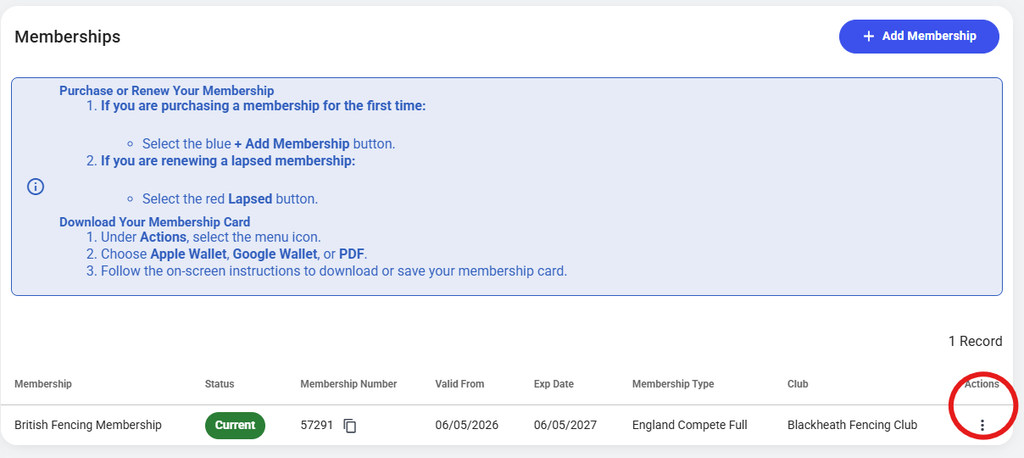
- Choose Memberships. There are some instructions, in blue but..
- Find the Actions menu at the right end of your membership record line (see below)
- Select Apple or Google wallet or download a PDF (see below the screen shot)
- If you follow the Google route you will go to your Google account and, if you have a wallet, its done. Or create a Wallet. It might come in useful for other passes and payment cards
- For PDF you need to save it to your phone. Put a short cut onto your Home page for quick retrieval
Keeping your British Fencing membership card on your phone
our membership card without using Apple Wallet or Google Wallet.
Android
- Download and save your membership card.
- Open your phone’s Files or My Files app.
- Find the downloaded membership card.
- Press and hold the file and open the menu.
- If available, select Add to Home screen or Create shortcut.
The exact procedure varies between Android phones. If your phone does not offer a Home Screen shortcut, save the card somewhere easy to find, such as Downloads, Documents, or a folder named British Fencing.
iPhone
Download the membership card and save it in the Files app. We suggest creating a folder called British Fencing so that the card is easy to find.
If you want an icon on your Home Screen, you can use Apple’s Shortcuts app:
- Open Shortcuts and create a new shortcut.
- Add the Open File action and select your membership card.
- Open the shortcut’s options and choose Add to Home Screen.
- Give it a name such as BF Membership.
You will then have an icon on your Home Screen that opens your membership card.
Tip: Whichever method you use, make sure the card is actually stored on your phone so that you can show it even when you have a poor or nonexistent internet connection.